Binary to Hexadecimal Calculator - Base 2 to Base 16
Binary to hexadecimal calculator converts binary strings into hexadecimal notation, decimal value, byte grouping, and padded nibble output.
Binary to Hexadecimal Calculator
Results
What Is a Binary to Hexadecimal Calculator?
A binary to hexadecimal calculator converts base-2 bit strings into base-16 notation without changing the underlying value. Binary writes a number with only 0 and 1, while hexadecimal writes the same number with the sixteen symbols 0-9 and A-F. The calculator removes spacing, validates the bit string, groups bits into four-bit nibbles, and reports the matching hexadecimal value.
This conversion is common in programming, networking, digital electronics, debugging logs, color work, and computer science classes. A long binary sequence can be hard to scan because every bit has to be read individually. Hexadecimal compresses that same value into shorter notation, so a byte such as 11111111 becomes FF and a 32-bit mask becomes eight hex characters instead of thirty-two binary characters.
The calculator is most useful when the source value is already binary and the next task needs a hex form. A developer may be checking a flag field, a student may be learning positional notation, or an analyst may need a compact representation of a bit pattern. The result panel keeps the sanitized binary, grouped binary, decimal value, bit length, nibble count, and byte count together, which makes review easier than a one-line conversion.
The calculator is intentionally limited to unsigned whole-number bit strings. It does not guess whether the input represents signed two's-complement data, fixed-point data, a floating-point encoding, or text bytes. Those interpretations depend on context outside the digits themselves. The page therefore reports the plain integer conversion and leaves format-specific meaning to the surrounding specification, assignment, protocol, or codebase.
For broader two-way base work, the Binary Converter covers binary, decimal, hexadecimal, and octal in one place.
How the Calculator Works
The binary to hex calculator uses positional notation. Every four binary digits form one nibble, and every nibble maps to one hexadecimal digit. The formula is simple: split the binary value into groups of four from right to left, convert each group into its base-10 value, then write that value as 0-9 or A-F.
If the bit count is not divisible by four, the calculator can add leading zeros for grouping. For example, 101101 becomes 0010 1101, which converts to 2D. The leading zeros do not change the numeric value; they only make the leftmost group a complete nibble. Decimal output is included as a cross-check because both binary and hexadecimal are alternate written forms of the same integer.
The calculation starts by removing only visual separators: spaces and underscores. After that cleanup, the remaining string must contain at least one digit and every digit must be 0 or 1. The conversion then uses the cleaned bit string for numeric value, while the grouping display uses either the left-padded string or the unpadded string depending on the selected mode. This keeps the mathematical result separate from the display preference.
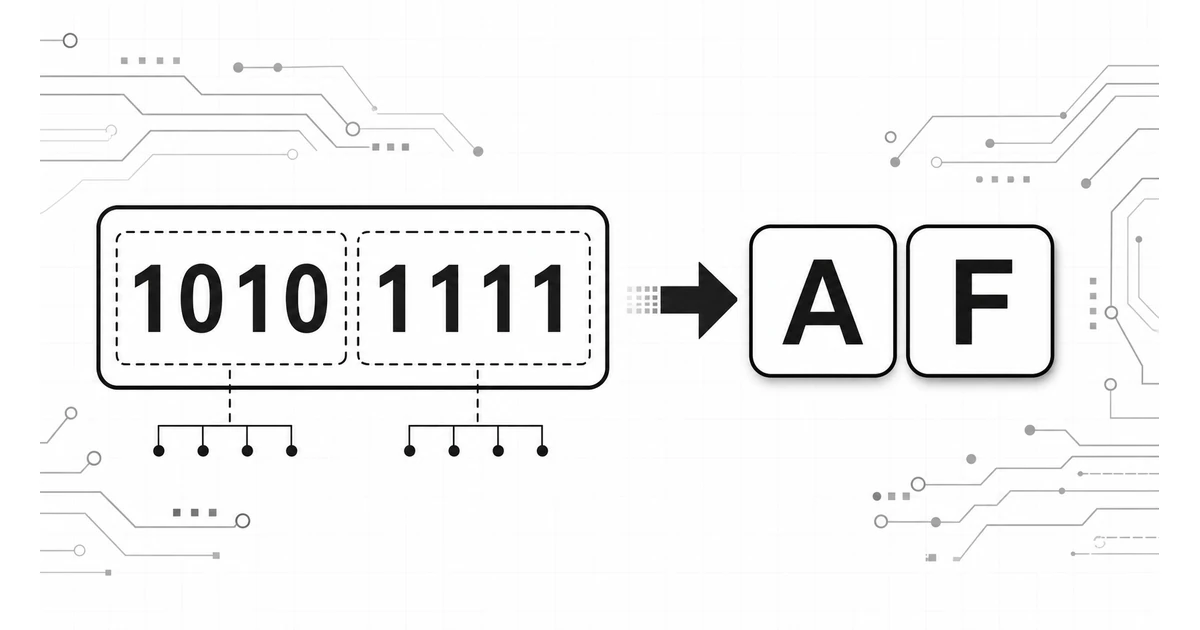
Each group follows the same place-value rule. Within a four-bit group, the positions are worth 8, 4, 2, and 1. The group 1010 equals 8 plus 2, or ten, so it is written as A. The group 1111 equals 8 plus 4 plus 2 plus 1, or fifteen, so it is written as F. Repeating that method across all groups creates the final hexadecimal value.
According to the ECMAScript specification, number-to-string conversion accepts radix values from 2 through 36, which covers base-2 and base-16 notation.
For the reverse direction, the Hex Calculator supports hexadecimal inputs and shows equivalent binary and decimal forms.
Key Concepts Explained
A reliable conversion depends on a few small concepts. The calculator exposes those concepts in the results so the converted value can be checked instead of accepted blindly.
Binary Digit
A binary digit, or bit, is a single 0 or 1. Bit strings often represent switches, flags, masks, byte values, and machine-level data.
Nibble
A nibble is four bits. Because four bits have sixteen possible patterns, one nibble maps cleanly to one hexadecimal digit.
Hexadecimal Digit
Hexadecimal uses 0-9 for values zero through nine and A-F for values ten through fifteen. Letter case is notation, not value.
Left Padding
Left padding adds leading zeros when the first group has fewer than four bits. It preserves value while making grouping explicit.
The link between a nibble and one hex digit is why hexadecimal is popular for compact machine-readable records. It is shorter than binary, more closely tied to bytes than decimal, and easier to compare against documentation that lists masks or identifiers in base 16.
Positional notation is the shared idea behind all three displays. In binary, each step to the left multiplies place value by 2. In decimal, each step multiplies place value by 10. In hexadecimal, each step multiplies place value by 16. The same integer can therefore be written many ways, and the chosen base usually depends on what makes the value easiest to inspect.
Nibble boundaries are especially useful when reviewing bytes. Two nibbles make eight bits, which means two hexadecimal digits can describe a byte. That is why byte values commonly range from 00 through FF in tables. The calculator's nibble and byte counts help detect inputs that are one bit short, one bit long, or missing the leading zeros expected by a fixed-width field.
Letter case is another concept that can look more important than it is. A-F and a-f represent the same numeric values. Uppercase is common in hardware tables and many textbooks, while lowercase often appears in programming output. The calculator offers both so the converted value can match the style of nearby material without changing meaning.
When source material begins as plain text, the Text to Binary Converter helps translate characters into bit strings before hex review begins.
How to Use This Calculator
- 1 Enter the binary value. Add a bit string such as 10101111, 1010 1111, or 1010_1111. Spaces and underscores may be used for readability.
- 2 Choose grouping mode. Left padding shows complete four-bit groups. The no-padding mode keeps the cleaned bit string visible as entered.
- 3 Select letter case. Uppercase and lowercase hex letters have identical value, so the choice should match the surrounding code, log, or class notes.
- 4 Review the outputs. Check the hex result, grouped binary, decimal value, bit length, nibble count, and byte count for consistency.
- 5 Correct invalid input. The calculator rejects letters, punctuation other than underscores, and symbols that cannot appear in a binary whole-number value.
According to MDN Web Docs, BigInt values can be converted to strings with a radix from 2 through 36, which includes binary and hexadecimal notation.
A careful workflow starts with preserving the original bit string somewhere outside the calculator. After conversion, the grouped binary output should be compared against that source in four-bit chunks. If the source expects a fixed width, such as 8, 16, 32, or 64 bits, the reported bit length should be checked before the hex result is copied into notes or code.
The decimal value is best treated as a verification aid rather than as the main output. Decimal is useful when a problem statement gives a known integer value or when a debugger displays the same field in multiple bases. If decimal and hex disagree in a manual check, the usual cause is a missing leading zero, grouping from the wrong side, or a copied character that is not actually binary.
Reset returns the sample input 1010 1111, left-padding mode, and uppercase output. That example is intentionally small enough to inspect mentally: 1010 maps to A and 1111 maps to F. It is a useful sanity check after browser refreshes, classroom demonstrations, or edits to the input value.
For base conversion beyond binary and hex, the Base Converter supports a wider set of radix choices.
Benefits of Using This Calculator
- •Cleaner review: Grouped binary and hex output appear together, so the conversion can be checked one nibble at a time.
- •Input tolerance: Spaces and underscores allow readable bit grouping without forcing the source value into one long uninterrupted string.
- •Decimal cross-check: Decimal output helps confirm that binary and hexadecimal displays represent the same integer.
- •Byte context: Bit, nibble, and byte counts show whether a value fits expected field widths such as one byte, two bytes, or four bytes.
- •Notation control: Uppercase and lowercase options match style guides, code examples, hardware tables, or classroom answer formats.
Hexadecimal also appears in web color work. The W3C CSS Color Module Level 4 describes CSS hex color notation as sRGB channels written with hexadecimal numbers.
The main benefit is not speed alone; it is traceability. A manual conversion can be correct but hard to audit later if intermediate groups are not written down. This calculator keeps the cleaned input and grouped representation on screen, so the final hex value has a visible trail back to the original bits. That is valuable in coursework, documentation review, and low-level debugging.
The output also helps separate value errors from formatting errors. If the hex digits are correct but the bit length is unexpected, the issue may be a missing leading zero rather than an arithmetic mistake. If the grouped binary looks right but decimal is surprising, the source value may have been interpreted under the wrong field width or signed-number convention.
For binary values that include fractional place values, the Binary Fraction Calculator covers binary digits on both sides of the point.
Factors That Affect Results
Invalid Characters
Any character outside 0, 1, spaces, and underscores makes the input invalid. Decimal digits such as 2 or 9 cannot appear in a binary value.
Leading Zeros
Leading zeros affect bit length and grouped display, but they do not change the integer value. This distinction matters when field width is part of the record.
Nibble Boundaries
Grouping from the right keeps the least significant bits aligned. Grouping from the left first can produce incorrect hex digits when padding is missing.
Whole Numbers Only
The calculator is for whole-number bit strings. Fractional binary values require a separate place-value method to convert digits after the binary point.
Large values are easier to audit when length is checked before interpretation. A value with eight bits equals one byte, and every two hexadecimal digits represent those same eight bits.
Field width can be just as important as the integer itself. The values 1111, 00001111, and 0000000000001111 all equal F numerically, but they describe different storage widths when a protocol or register table expects four, eight, or sixteen bits. The calculator preserves the cleaned binary and reports length so that width-sensitive records can be checked before the compact hex form is reused.
Separators can also affect review. Spaces and underscores are accepted because they are common in notes and code-style grouping, but they are removed before conversion. A copied value from a document may include hidden line breaks or formatting marks, so invalid-input feedback should be treated as a prompt to inspect the source string rather than as a math failure.
Signed values require special care. The same bits can represent a positive unsigned integer or a negative two's-complement integer depending on the stated width. This calculator reports the unsigned whole-number conversion because that is the base conversion itself. Signed interpretation should be handled only after the field width and encoding rule are known.
For digit grouping in another representation, the Scientific Notation Equation Calculator is useful when powers and compact numeric notation need separate review.
Frequently Asked Questions
How does binary convert to hexadecimal?
Binary converts to hexadecimal by splitting the binary string into four-bit groups from the right. Each group maps to one hexadecimal digit from 0 through F, so 1010 becomes A and 1111 becomes F.
Why does each hexadecimal digit equal four binary digits?
A hexadecimal digit has 16 possible values. Four binary digits also have 16 possible patterns, from 0000 through 1111, so one hex digit can represent exactly one four-bit binary group.
Should binary be padded before conversion?
Left padding is normal when the binary length is not a multiple of four. Padding adds leading zeros only for grouping, so it changes the display format but not the numeric value represented by the bits.
Can this calculator handle large binary values?
The calculator treats the binary input as a string and uses integer base conversion, so it can process long whole-number bit strings. Extremely large values may be easier to review in grouped output than in decimal output.
What is the difference between binary, decimal, and hexadecimal output?
Binary is base 2, decimal is base 10, and hexadecimal is base 16. The outputs represent the same value in different notation, which helps when comparing computer-level bits with human-readable numeric records.
Does spacing in the binary input matter?
Spaces and underscores are removed before validation, so grouped input such as 1010 1111 or 1010_1111 is accepted. Any character other than 0, 1, spaces, or underscores is rejected.